Monday, 27 February 2012

Use Kaspersky Antivirus For Lifetime Without any Serial (or) Patch


Hi Friends!! Iam Back with the New Intresting Atricle 
that is Use any Kaspersky Antivirus or Kaspersky Inte
rnet Security etc For Lifetime.

Refer also my previous Article About Antivirus that is
All Antivirus 2012 Full Versions For Free.
In that post all antiviruses having the 6 mnths or 1 Year Subscriptions. But now i explained about how to use
Kaspersky Antivirus for lifetime.


Generally Kaspersky Antivirus Provide 30 Days Trial
Only, So there are the few steps that you have to per
form when your trial license going to expire after 30
days for getting a new trial license.


Follow The Instructions Below:-


Step 1 :- First Delete old key and then go to Settings-options In Kaspersky and Turn Off Enable Self Defence and then Click OK.


Step 2 :- Click Start Button and then go to Run and in that
write regedit and Click Ok ( i.e Open Registry Editior ) 
and go through These :-


For 32bit OS: HKEY_LOCAL_MACHINE \ SOFTWARE \ KasperskyLab \ protected \ AVP9 \ environment


For 64bit OS: HKEY_LOCAL_MACHINE \ SOFTWARE \ Wow6432Node \ KasperskyLab \ protected \ AVP9 \ environment.


Step 3 :- Right Look For PCID and then right click
and modify three or four last numbers or letters.
Ex :- (8F10C22F-6EF6-4378-BAB1-34722F6D454).
And Then Enter any other Three-Letter Four-Number
and close the Registry Editor.


Step 4 :- Then Right Click On the Kaspersky Icon In the 
Taskbar and choose Exit.


Step 5 :- And Go to Start Menu - Programmes Menu ,
Open the Kaspersky and when you activate searching
Trial License and you have the new License of a Month.


Step 6 :- Go to Kaspersky Settings And Turn On Self-Defence.


By this You will got again 30 days Trial Period, so there
is no need to search the keys.
Do this again for next months also you will update or
do this for every trial license is over , this is simple so
dont activate the patch try tis simple instructions and
get life time validity.


Note :- Basically The Patches that you found in internet are generally depends on that trick .
They simply make the changes in the registry and change identification of your computer to the Kaspersky server, 
thus Kaspersky log server recognizes you as a new user 
and assigns you new trial license.


If you like this post Plz +1 d this and share .Keep 
Contact With Us.

Reliance 3G Free Gprs Trick and Hack 2012 with Super Fast


Note :-


Try this Trick at your Own Risk.
Keep Your Sim Balance Low .
And This trick is working at the time of Publishing.


Follow the Instructions Below :-


1 ) Make a New Connection with the Below Details :-

  •     Profile Name: Reliance Free
  •     APN (Access Point Name) : rcommms
  •     Use Proxy: No or Disabled.


2 ) And Next Download Proxyfire From Below Link 
     Download Link :- ProxyFire


3 ) Then Run the Proxyfire and Goto Options.


4 ) Click on proxy settings. then click on Add.


5 ) Now Fill the Details as Below :-

  • Proxy Address or Server: 68.84.122.254
  • Proxy Port: 3178
  • DNS : 198.153.192.1
  • Now use APN as rcommms and dial this connection
  • with number : *99#

Thats It ,you Will Get Free Gprs Access to your Mobile  if
you like this post share and +1 this and keep contact with us.

Download Google Books Easily


As Google books has the largest collection of books around the world.You will surely get all the books you need. But, the problem is that they don't allow you to download the books. Although, you can read them online as many times you need.

Here i've a method by which you can download these ebooks in pdf format to your PC and read them later on any device.
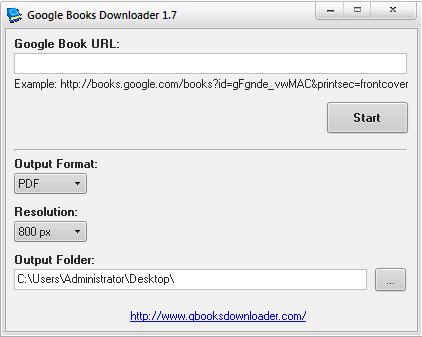
  • To download ebooks from google we need a handy software gbookdownloader.
  • It can download any ebook from Google books for free.
File Size : 820.7 Kb

File Size : 5.0 Mb

HOW TO USE 
  • Download and Install gbook downloader.

  • Now go to Google books (/>). 
  • Search for the book, Open the the page that contains the book, and copy the URL of the page from the top.
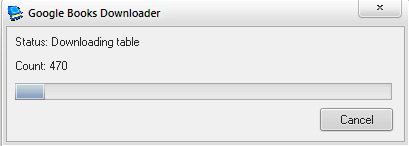
  • Now paste the copied url  in gbookdownloader and press start.

Sunday, 26 February 2012

How to tweet longer than 140 characters limit from Twitter

Twitter is a popular micro-blogging website on which users are allowed to post tweets of up to 140 characters only. But there are some services which offers users to tweet beyond this limit. But it is hard to find an app for this. But Android has a cool app which offers users to tweet more than 140 characters.
TwitLonger is a free app in the Android market that offers users to tweet more tha 140 characters limit. After installation, you need to authorize the app to access your Twitter account. After that compose the tweet from the textbox. You will see a character counter just above the textbox to know the lenght of the tweet you are going to post. After composing the mail, click on Tweet button. Now go to your Twitter account from the web browser and see the tweet posted. You will see a tweet posted by the TwitLonger. Characters in the Tweet that extend beyond the 140 character limit, you will see a link saying tweets posted via Tweet Longer.  In order to read the full message, you need to hit the short URL provided alongside the message.

PAGEVIEWS