Thursday, 8 May 2014

[May 08,2014]Fresh nod32 keys

Username:TRIAL-0112080040
nod32key:5ssc5fs8×2
Username:TRIAL-0112080038
nod32key:u5rrxt9sk3
Username:TRIAL-0112080035
nod32key:ak6mp4hav3
Username:TRIAL-0112080034
nod32key:sk3p2hfj6j
Username:TRIAL-0112080032
nod32key:k6frh7arfb
Username:TRIAL-0112080030
nod32key:2c43e5apnc
Username:TRIAL-0112080025
nod32key:pf74csbcbb
Username:TRIAL-0112080008
nod32key:ner6kr848k
Username:TRIAL-0112080004
nod32key:fcnat86evs
Username:TRIAL-0112079984
nod32key:detsu36kb8
Username:TRIAL-0112079973
nod32key:vrnm9fatxe

Thursday, 1 May 2014

Freecharge new 20 rs All Android user

(1)Get Free Rs.20 Recharge Form Freecharge for App download


Desi dime Android app users have opportunity to grab free 20 rs freecharge voucher once again


Steps:-

Download desi dime app from playstore

After downloading login and go to coupon section,there click freecharge coupon 20 rs
http://s28.postimg.org/w7ktwya65/wpid_2014_04_29_21_38_50.jpg


Then enter your mobile for 1 time verification


You will get a six digit password ,input it and done
Freecharge voucher will be copied on clip board of your phone ,just paste it in freecharge app.

Validity=31-05-2014

Wednesday, 30 April 2014

Trick To How to view saved password in google chrome

How to do that ?

1. Open any website where password is saved by user. Here i will demonstrate with facebook but it will work on any website.

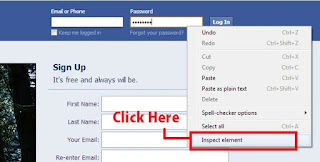
2. Right click on password (Dots or asterisks) as shown in below image.

3.Then click on Inspect element.


4.Then change Password to text as shown in below picture.

Before changing it will look like below:


After changing it will look like below:


5. Done now asterisk or dots will changed to tex
Here is another trick...

This trick is simple yet very powerfull to view or hack saved password in google chrome. It does not matter for which website the password is saved it will work on all of them. It will work on Facebook, Gmail, Yahoo, twitter and many more. If you get your hands on your friend computer you can hack their password with this simple little trick. It does not require any software or addons to be installed on your computer. Lets get started.


1. Open Google Chrome

2. Go to Settings (Its on the Right Corner)

3. Then Click on Advance Settings

4. Scroll Down and their will be password and forms from their click on Manage saved password.

5. Then list of all websites whose passwords are saved on browser will be listed.

6. Click on show to view those passwords

Enjoy!!

Saturday, 26 April 2014

NOD32 ANTIVIRUS NEW USERNAMES AND PASSWORDS

Username:TRIAL-0111298741
nod32key:52j5vxukj7
Username:TRIAL-0111298734
nod32key:p99jexe5bc
Username:TRIAL-0111298730
nod32key:x4tpse3m47
Username:TRIAL-0111298723
nod32key:m2ff5m5kdx
Username:TRIAL-0111298718
nod32key:njf6j49s33
Username:TRIAL-0111298714
nod32key:sed3n3v3ub
Username:TRIAL-0111298712
nod32key:d458dmhpj3
Username:TRIAL-0111297892
nod32key:8vtxbpe9r6
Username:TRIAL-0111297889
nod32key:jb2ubnkn24
Username:TRIAL-0111297887
nod32key:dtprhf4cau
Username:TRIAL-0111297885
nod32key:rvkbkjapjm

PAGEVIEWS